Put this number on ur enemies sim
and block the sim :-
**04*3814*7529*68243#
To unblock the sim call
customer care and get the puk code
Showing posts with label TIPS N TRICKS. Show all posts
Showing posts with label TIPS N TRICKS. Show all posts

Delete any FACEBOOK Account
call customer care without wasting ur time
If u want to call customer care without wasting a time
Then follow this.
Simply dial
"your cust. care no."p2p2p2p9
Then follow this.
Simply dial
"your cust. care no."p2p2p2p9
DOWNLOAD YOUTUBE ON MOBILE IN 3gp,mp4&flv
NO NEED ANY CONVERTER
DOWNLOAD WITH ANY BROWSER
JUST COPY& PASTE IN new url
THIS IS NEW TRICK 4
YOUTUBE DWNLOAD
VERY SIMPLE...
DOWNLOAD WITH ANY BROWSER
JUST COPY& PASTE IN new url
THIS IS NEW TRICK 4
YOUTUBE DWNLOAD
VERY SIMPLE...
know your own Sim number (ALL NETWORKS)
15 Killer Google Chrome Features You Might Not Know About
Google Chrome has been steadily gaining in the browser market share since its launch 2 years ago. It’s not without its flaws but it definitely falls in the “kinda cool” category. Its simplicity and minimalistic, yet feature-rich, interface caused a lot of users to ditch their old and trusted browser in favor of this new tool.
Chrome has a lot of obscure features which could immensely enhance one’s browsing productivity if he were to know about them. This post intends to do reveal exactly those features.
Some of the following features might be something you already know. But as you read on, you are sure to bump into an amazing hidden chrome feature that you weren’t aware of, and that’s what makes this post worth going through. So, check it out!

Chrome has a lot of obscure features which could immensely enhance one’s browsing productivity if he were to know about them. This post intends to do reveal exactly those features.
Some of the following features might be something you already know. But as you read on, you are sure to bump into an amazing hidden chrome feature that you weren’t aware of, and that’s what makes this post worth going through. So, check it out!
-- BOOST UP YOUR BROWSER --
Speed Up Your Browsing 10X faster!
FOR FIREFOX USER
Follow my instruction very carefully ok?
1. Type "about:config" into the address bar and hit enter. Scroll down and look for this
Set this to true by double clicking them
FOR FIREFOX USER
Follow my instruction very carefully ok?
1. Type "about:config" into the address bar and hit enter. Scroll down and look for this
Set this to true by double clicking them
Change anonymous status on Facebook !!!
First Remember these rules :
1. No Abusive Language..
2. Every message is recorded with your I.P. Address.. Using proxy wont make you secure..
3. Anything BIG happens I.P. will be given and you might face a BIG problem.
4. Stealing Identity is a CRIME.
5. Use it for small Pranks..
6. Don't use it to update any Girl's Status ( Its not gud to hurt sumone's feeling ) ..
7. it will be stopped by my friend if ABUSIVE LANGUAGES are used.
HIDE FOLDER WITHOUT ANY SOFTWARE [FOR nokia S40 PHONES]
MOST OF THE TIMES I SAW MANY PEOPLE ASKING ABOUT HOW TO HIDE A FOLDER IN S40 PHONES AS NO JAVA SOFTWARE WORKS FOR ALL VERSIONS OF NOKIA S40.
Combine Two Internet Conncetions To Get Higspeed
Personally I have combined My Broadband Connection with TATA DOCOMO vai My Usb Modem (HUAWEI E1550) U can use Your mob.And Increased 30kbps
use your Gmail account to send and receive emails from multiple addresses
In this post I am going to show you how to use your Gmail account to send and receive emails from multiple addresses. Most of us own more than one email account say for example, one from Gmail, one from Yahoo and one from Hotmail. If you are tired of logging into multiple accounts to check your inbox or to send emails, I have a solution here.
10 Tips to Avoid Getting Adware
Adware, malware, spyware and viruses can bring your system to its knees. They are detrimental, lowering the performance of your computer. You might need to replace data. You might lose unique files. Keep the nasties away from your computer using these ten simple tips.
Orange UK offers Sony Ericsson XPERIA X10 mini Fashion Edition
Orange UK is going to offer exclusively a Fashion Edition of the smallish Sony Ericsson XPERIA X10 mini. It's a standard black XPERIA X10 mini with two free fashion jackets and some style-oriented apps and wallpapers.
The two extra jackets you get are pink and white decorated with fashion flower motives. The ladies are obviously the target of this campaign.

Sony Ericsson XPERIA X10 mini Fashion Edition
The XPERIA X10 mini comes with Android 1.6, but the 2.1 Eclair update is already rolling out.
Orange UK offers the XPERIA X10 mini Fashion Edition for free on a two year contract with a 20 pounds monthly tariff.
Windows Phone 7 OS review: From scratch
Introduction
A modern smartphone OS needs to be balanced - drawing on excellent cloud services and standing on the cutting edge of software. The Windows Phone 7 OS is nothing like Windows Mobile. It's got a trendy, almost magazine-like new look, and it is incredibly simple to use despite its different approach to just about everything.
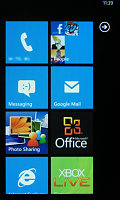

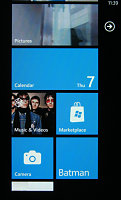
Windows Phone 7 has a brand new interface
Microsoft received a loud collective boo when it revealed that Windows Phone 7 will not support multitasking. But the company is trying to break the mold here. Instead of making a playground for apps, it made WP7 the “killer app”. Anything extra that you install just integrates in and extends the relevant features.
They must’ve sat down to think. A complete makeover or start from scratch. In an odd way, it looks like they never actually made up their mind. That doesn’t matter though. The important thing is Windows Phone 7 is breaking loose from its “Windows Mobile” heritage and changes everything about itself – from the homescreen to the very nature of apps.
Key features:
- Premium mobile OS (high minimum hardware requirements)
- Clean, uncluttered interface with distinctive design language
- Easy and thumbable user interface
- Smooth operation with cool animations and transition effects
- A fresh start with no legacy support needed
- Backed up and developed by one of the largest software companies in the world
- Excellent MS Office mobile implementation
- Top-notch social integration
- Excellent cloud services integration (SkyDrive, Windows Live, Xbox Live)
- Wireless syncing of multimedia content
- Internal memory expandable via microSD card slot (where available)
Main disadvantages:
- No system-wide file manager
- No videocalling
- Limited third-party apps availability
- No Bluetooth file transfers
- No USB mass storage mode
- No multitasking
- No copy/paste
- Too dependent on Zune software for computer file management and syncing
- No music player equalisers
- No Flash or Silverlight support in the web browser
- No sign of free Bing maps Navigation so far
- No DivX/XviD video support
- No internet tethering support
- New ringtones available only through the Marketplace
- Swapping memory card requires hard reset; cards not readable by computer
Microsoft is not fossilized in their own mythology. They are finally looking competitive in the apps and services part of smartphoning and Windows Phone 7 is their ticket out of the mold.
Bing has evolved and is perhaps drawing people away from Google Search. Bing Maps even beats Google Maps on some counts (Bird’s eye view is so much better than the plain top down view). The Windows Live Messenger got social with Facebook integration. Even the new Internet Explorer 9 beta is impressive – you know, for an IE iteration, at least.
We know what you’re thinking: we came here for the Windows Phone 7 review so where is it and why should we care about Microsoft’s new services? But you should. Because Microsoft has made their new Windows Phone 7 the perfect mobile platform for accessing all of their online services.
Bing Search and Maps are a part of the OS, rather than apps, so are Xbox Live and the Zune Marketplace. And the new Internet Explorer mobile is starting to make up for years of embarrassment.




The Zune Marketplace • Games with Xbox Live integration
If you’ve got a traditional app-centric approach, you need to figure out what app does what. The downfall is that related content gets handled by vastly different apps, which complicates things. Enter Microsoft’s solution to the issue.
The center of the new mobile experience are the so-called Hubs – they herd together related stuff from the Web, from apps and from services.



The People hub knows what’s new with Dexter
In Windows Phone 7, the People hub puts together the usual phone contact info with the social networking stuff. In short, everything about someone you know can be found here. Sure, Sense UI and MOTOBLUR for example are doing the same magix on Android OS. But Windows Phone 7 applies this whole concept to all the other features, not just the phonebook. And it’s the stock interface, not some third-party software enhancement.
The well-though OS however is not without its downsides. You can see we've got a really long list of disadvantages up there, but Apple iOS and Google Android had even longer ones at launch - not to mention the superior hardware that WP7 debuts on. It's also good to know that Microsoft engineers are already working hard on fixing those up in further updates to the OS. For instance, they promise copy/paste functionality in the first months of 2011. We hope they've got many more of those in the pipeline. So hold your horses with the bashing and hop on on the guided tour to Microsoft's latest mobile OS, because it's nothing like you've seen before and it deserves the benefit of a doubt at this early stage
make accounts with google without any verification
Wanna know how to make
accounts with google without
any verification or whatever
Well, let me tell you how I do
it every day without deleting
cookies or anything.
You can do it with proxy or
without proxy. For me it works
everytime. So, let's start:
1. Go to gmail.com and hit the
sing up page
2. For first and last name I use
imdb.com to search names
from movies or names of the
actors, I combine them, I use a
unique name that I believe is
not used by anyone. If google
will detect that name in their
database they will require SMS
verification. So go with a
unique name, not the popular
ones like John Doe or
whatever. If you will use the
same name on other account
they will require SMS
verification so stick with a
unique one. Everything need
to be unique.
3. For login name I don't use
numbers and is unique, I will
not use that username again. I
only use dot in username. If
you will create another
username similar to that,
again, they will detect and
they will ask for SMS
verification on both accounts.
4. Password. I use a unique
password for every account. If
you will make a few accounts
with the same password they
will detect them and they will
ask you for SMS verification, so
try a unique password. I don't
use number in passwords. And
I don't use similar passwords.
5. Security Question. Write
your own question. Don't use it
in other account.
6. I don't use recovery email.
7. The rest it is at your choice.
I think that at this part you
understand that your whole
profile must be unique. If you
use the same name, password,
similar username with other
accounts they will always
request SMS verification. Be
unique and you will not even
need a proxy. I do it every day
and I can't even remeber
when they requested me SMS
verification. I know this from
my experience. ...............................
accounts with google without
any verification or whatever
Well, let me tell you how I do
it every day without deleting
cookies or anything.
You can do it with proxy or
without proxy. For me it works
everytime. So, let's start:
1. Go to gmail.com and hit the
sing up page
2. For first and last name I use
imdb.com to search names
from movies or names of the
actors, I combine them, I use a
unique name that I believe is
not used by anyone. If google
will detect that name in their
database they will require SMS
verification. So go with a
unique name, not the popular
ones like John Doe or
whatever. If you will use the
same name on other account
they will require SMS
verification so stick with a
unique one. Everything need
to be unique.
3. For login name I don't use
numbers and is unique, I will
not use that username again. I
only use dot in username. If
you will create another
username similar to that,
again, they will detect and
they will ask for SMS
verification on both accounts.
4. Password. I use a unique
password for every account. If
you will make a few accounts
with the same password they
will detect them and they will
ask you for SMS verification, so
try a unique password. I don't
use number in passwords. And
I don't use similar passwords.
5. Security Question. Write
your own question. Don't use it
in other account.
6. I don't use recovery email.
7. The rest it is at your choice.
I think that at this part you
understand that your whole
profile must be unique. If you
use the same name, password,
similar username with other
accounts they will always
request SMS verification. Be
unique and you will not even
need a proxy. I do it every day
and I can't even remeber
when they requested me SMS
verification. I know this from
my experience. ...............................
Subscribe to:
Posts (Atom)
